
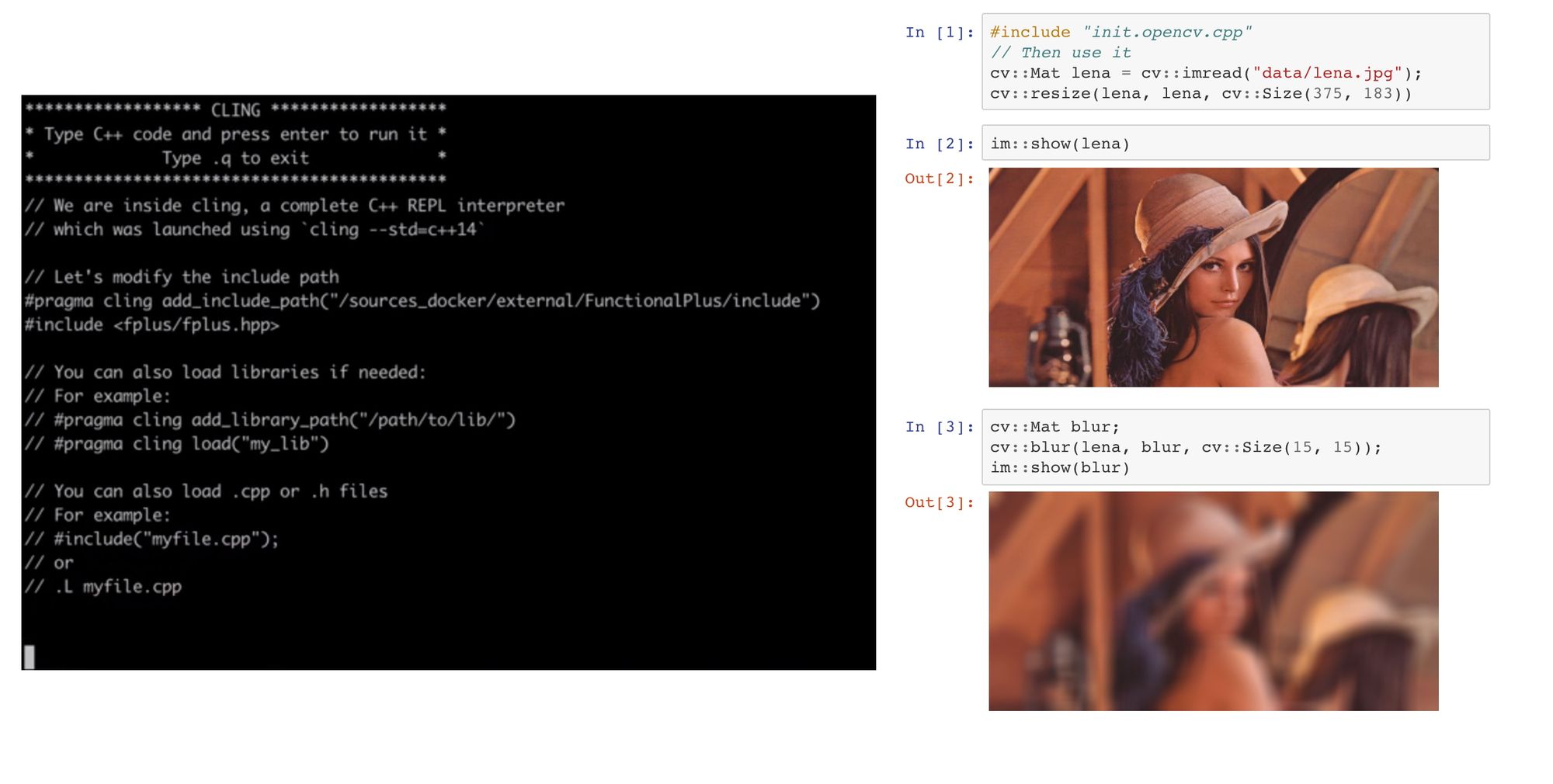
An efficient way to prototype C++ applications & research work and to write demonstrations or teaching material using C++
A Read-Eval-Print-Loop (REPL) enables to leverage very rapid and robust application development, prototyping and testing. This kind of development environment originates from the early days of functional programming (Lisp machines and the like), and is common in functional and scripting languages.
As a compiled language, C++ was out of the loop for a long time.
Enters CLING
Cling realizes the read-eval-print loop (REPL) concept for the C++ language. Thus, you can gain in speed of development while the compiler (clang) still checks your code and guarantees a native speed of execution.
Hands-on demonstrations
This article demonstrates how easy and useful it can sometimes be to work in this kind of environment in C++. This is especially useful in order to develop with a functional approach (such as with the range-v3 library), and for research and/or training applications.
This article is voluntarily very short, so that you can jump to the hands-on demonstrations. You will be able to use the a C++ REPL online, without even having to install anything.
Go to the demonstration notebooks
(opens in a new window)About the tools that were used to write these notebooks
These notebooks were written using REPL tools, namely jupyter notebook, xeus cling and of course cling. More info in the notebooks themselves.
Comments
Comments from the original site. Comments are now closed.
Sean Parent, 2019-01-07
A tip to make your notebooks more interactive; Use immediately executed lambdas to create a scope for variables, then you can edit and re-execute without getting a duplicate definition error. For example - in your first notebook you can do this:
[] {
    cv::Mat blur;
    cv::blur(lena, blur, cv::Size(5, 5));
    return im::show(blur);
}()
Then you can change the blur radius an experiment without re-executing the entire notebook. Thanks for the article, I use Jupyter Lab almost daily but still picked up some new info in your examples!
Pascal Thomet, 2019-01-08
Wow, I am honoured to have you as the first commenter on this article, many thanks for your interest!
I do agree with you and I added some advices about immediately executed lambdas,
and I added some advices about them in the opencv example
and in the advices page
If you were interested in this article, may be you could be interested in a project I am currently working on. Its intent is to make it easier to identify types during interactive coding sessions (with Cling and/or jupyter), and its manual is completely interactive (since it is actually a jupyter notebook itself).
Here is the link : https://github.com/pthom/cl...
This project is still very much in its infancy, and I did not communicate about it yet on any public site (I will probably do it in the next weeks), but if you have some time to look at it, I would be very interested in your input.
Note : Concerning IIL, I do have a (may be) controversial opinion about the preprocessor. My opinion is that we would need a better preprocessor in order to be able to make such constructs easier to digest for less experienced programmers (something closer to lisp macros in fact :-).
I even once wrote a hackish macro which reads like this:
#define const_initialize(type, name, initialization_code) \
  const auto name = [ & ]()                 \
  {                                         \
    type name;                              \
    initialization_code;                    \
    return name;                            \
  }();
And could be used like this:
const_initialize( std::vector<int>, vec,
  for (unsigned i = 0; i < 10; i++)
    vec.push_back(i);
);
However, I never advised my team to use it in production, given the bad reputation of C++ macros.
Thanks again!
Romain Sacchettini, 2019-02-14
Joli !
Pascal Thomet, 2019-02-14
Merci Romain ! Bonjour depuis Paris :-)
Romain Sacchettini, 2019-02-21
https://godbolt.org/
Not the same goal as cling, but in the same spirit, copy and paste, try code on the fly, and see on the fly the result in assembly code, with highlighted lines (grouped by color), in order to match i.e. C++ instruction to the corresponding group of assembly instructions.
I ended up on it via an article pointing out that the C++ code that looks the most optimised is (far from) not necessarily the fastest given how much is going on in modern compilers optimisations.
It's the only website I found that allows you to compare so try the same code using so many compilers so easily, and that highlights assembly insturction / high level code matches.
Neat !